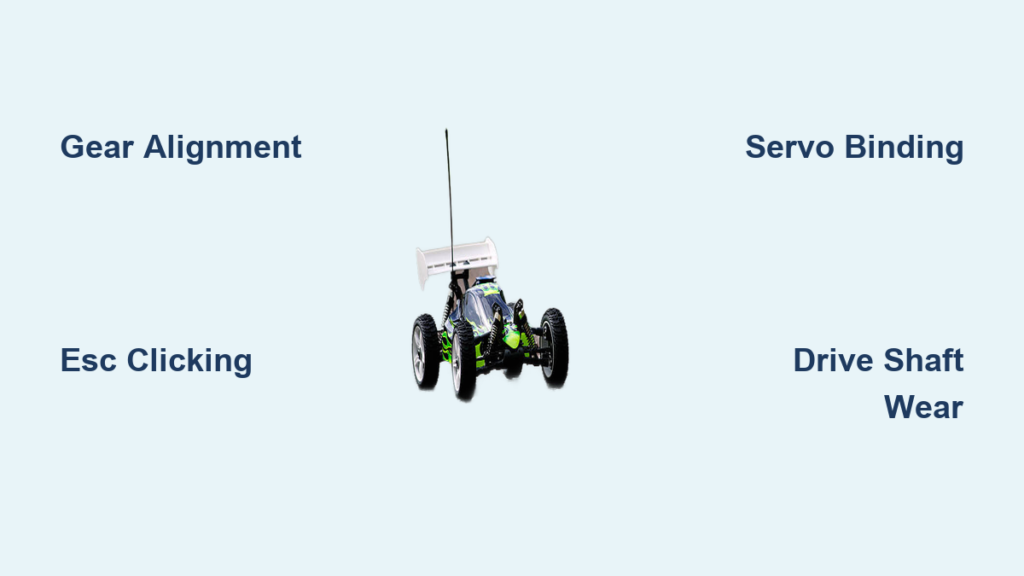
That persistent clicking sound coming from your RC car isn’t just annoying—it’s your vehicle’s way of telling you something needs attention. Whether you’re a weekend hobbyist or a competitive racer, understanding why your RC car clicks and knowing how to fix it can save you time, money, and frustration. This comprehensive guide walks you through every major cause of clicking noises in RC cars, from quick DIY checks to more involved repairs, so you can get back to enjoying your vehicle with confidence.
Pinion and Spur Gear Alignment Problems
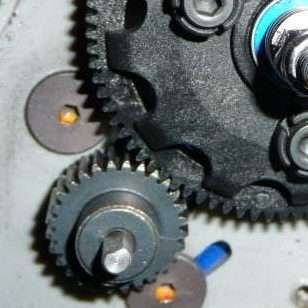
The interaction between your pinion gear (attached to the motor) and spur gear (connected to the transmission) is critical for smooth operation, and problems here produce distinctive clicking or grinding sounds. When these gears aren’t properly aligned, they create that telltale clicking noise that worsens under acceleration. To check your gear mesh, rotate the spur gear manually while observing the pinion. You should feel smooth rotation with minimal resistance—any clicking or grinding indicates improper mesh.
Adjust the gear mesh according to your manufacturer’s specifications, typically allowing a small amount of play (about the thickness of a sheet of paper) between the gears when properly set. Too tight causes excessive friction and clicking, while too loose creates gear lash that produces similar noises. If you find damaged teeth on either gear, replace the affected component immediately to prevent further damage to its counterpart.
How to Properly Adjust Gear Mesh
Begin by loosening the motor mount screws just enough to allow motor movement. Slide the motor toward or away from the spur gear to achieve the correct mesh. When properly adjusted, you should be able to rotate the spur gear by hand with slight resistance but no binding. Tighten the motor mount screws gradually in a crisscross pattern to maintain alignment. After adjustment, run your RC car at low speed on a stand to verify the clicking has stopped before taking it for a test drive.
ESC Power Delivery Failures
Your electronic speed controller clicking repeatedly often indicates it’s attempting to deliver power but encountering an obstacle. This clicking typically occurs when the ESC tries to send power to the motor but detects a problem in the circuit. Unlike mechanical clicking that changes with movement, ESC clicking happens at regular intervals regardless of whether your car is moving.
Testing Battery Connections for Clicking Issues
Begin by checking your battery connections and ensuring they are secure and free from corrosion. A loose connection at the battery terminals can cause the ESC to click as it struggles to maintain consistent power delivery. Verify that your battery is fully charged—an undercharged battery often causes ESC clicking as voltage drops under load. Test the battery with a multimeter to confirm it’s holding proper voltage, and try a different battery if available to isolate the issue.
If connections appear sound but clicking persists, inspect the ESC for visible damage like burnt components or melted plastic. Many modern ESCs have LED indicators that can help diagnose the problem—refer to your manual for blink code meanings. If your ESC shows no lights when powered on but you hear clicking, this typically indicates a power delivery problem rather than ESC failure.
Servo Gear Binding During Steering

When clicking occurs specifically during steering movements, your steering servo is likely straining against resistance or has internal mechanical problems. This type of clicking typically happens only when you move the steering stick on your transmitter and may be accompanied by sluggish or unresponsive steering.
Clearing Steering Linkage Obstructions
Begin by removing the wheels and checking for any obstruction in the steering linkage, tie rods, or steering servo saver. Debris, dirt, or a foreign object caught in these components can cause the servo to work harder than necessary, resulting in clicking as the internal gears strain against resistance. Clean all steering components thoroughly using compressed air or a small brush, then apply appropriate lubricant to moving joints.
If no obstruction exists, check the servo saver for wear on its spring mechanism and ensure it’s properly tensioned according to your model’s specifications. A worn or improperly adjusted servo saver can cause clicking as the servo attempts to move but experiences inconsistent resistance. Some servo savers can be adjusted to reduce binding, which often eliminates the clicking sound without requiring servo replacement.
Drivetrain Component Failures
Mechanical problems in your RC car’s transmission and drivetrain frequently produce clicking sounds that change with vehicle movement. Unlike electronic clicking that occurs at regular intervals regardless of movement, drivetrain clicking typically correlates with wheel rotation or specific driving conditions. Identifying the exact location requires systematic inspection of moving components.
Differential Problems Causing Clicking During Turns
Clicking that changes with turns often indicates differential problems. In RC cars with gear differentials, worn or improperly adjusted differential screws can cause clicking during directional changes. Check your differential tightness—too loose and the gears click as they shift, too tight and they bind and produce resistance.
To adjust your differential, refer to your model’s specifications for proper tightness. Typically, you should be able to rotate the differential case by hand with slight resistance but no clicking. If adjustment doesn’t resolve the issue, disassemble the differential and inspect the gears for wear or damage. Replacing worn differential components eliminates clicking and prevents further damage to your drivetrain.
Universal Joint Wear in Drive Shafts
Drive shaft clicking typically occurs at higher speeds or during acceleration. Universal joints (U-joints) in drive shafts can wear out or develop play, producing clicking as they rotate. To check for this issue, elevate your RC car and rotate the wheels by hand while listening for clicking from the drive shafts.
Inspect all U-joints for visible wear, excessive play, or damaged bearings. A properly functioning U-joint should have minimal play—any noticeable movement indicates wear. Replacing worn U-joints eliminates clicking and prevents potential drivetrain failure during operation. When installing new U-joints, ensure they’re properly seated and secured according to manufacturer specifications.
Loose Suspension Components Clicking
Sometimes clicking originates from suspension components rather than the drivetrain. Shock absorbers, suspension arms, and their mounting points can develop clicking over time due to worn bushings, loose screws, or damaged shock caps. This type of clicking often occurs when driving over bumps or during aggressive maneuvers.
Identifying Worn Suspension Bushings
Perform a thorough visual inspection of all suspension components, checking for cracked or worn bushings, loose mounting screws, and damaged shock seals. Squeeze each suspension component to feel for play that shouldn’t exist, and tighten all screws to manufacturer specifications.
Worn bushings often show visible cracks or deformities. When bushings wear out, they allow components to move beyond their designed range, creating clicking sounds as parts shift during operation. Replacing worn suspension bushings with high-quality replacements eliminates clicking and maintains proper handling characteristics. Use the correct size and durometer rating for your specific RC car model.
Motor Bearing Failures

Electric motors in RC cars can produce clicking sounds for various reasons, with bearing failures being a common culprit. Brushless motors are known for their reliability, but their bearings can fail over time, producing clicking or grinding sounds as the rotor rotates. Motor bearing issues typically create clicking that correlates with throttle input and increases with motor speed.
Diagnosing Faulty Motor Bearings
To diagnose motor bearing problems, remove the motor from the vehicle and spin the shaft by hand. If you feel roughness, grinding, or hear clicking as the shaft rotates, the bearings likely need replacement. A healthy motor should spin smoothly with minimal resistance and no unusual sounds.
Most brushless motors have bearings that can be pressed out and replaced, though some budget motors require complete replacement when bearings fail. When replacing bearings, use the correct size and quality bearings specified for your motor. Proper installation ensures smooth operation and prevents premature failure.
Connector and Wiring Faults
Loose or damaged battery connectors produce inconsistent power delivery that can cause clicking in the ESC and motor. This type of clicking often occurs during acceleration or when changing directions, as increased power demands expose connection weaknesses.
Securing Critical Electrical Connections
Inspect all connectors for bent pins, corrosion, or loose connections. Clean corroded connectors with contact cleaner and bend any bent pins back into position. If connectors show significant wear, replacing them ensures reliable power delivery and eliminates clicking caused by intermittent connections.
Similarly, inspect all wiring for damage, fraying, or pinched sections. Damaged wires can cause voltage drops and inconsistent power delivery, leading to clicking from components struggling to operate on inadequate power. Replace any damaged wiring with appropriately gauge wire and secure all connections with proper soldering techniques and heat shrink tubing.
Prevention Through Regular Maintenance
Preventing clicking noises requires consistent maintenance habits that catch potential problems before they develop into serious issues. Establish a routine inspection schedule that includes checking all moving components, fasteners, and electronic connections before each driving session.
Creating an Effective Maintenance Routine
Develop a checklist that covers all critical components: gear mesh, drivetrain tightness, suspension integrity, electrical connections, and general wear points. Keep your vehicle clean, particularly around the gears, bearings, and suspension components, as accumulated dirt and debris cause premature wear.
Lubricate moving components according to manufacturer recommendations, using appropriate lubricants for each application. Apply lubricant sparingly to bearings, gears, and pivot points, wiping away any excess to prevent dirt accumulation. Store your RC car properly when not in use, protecting it from dust, moisture, and temperature extremes.
When your RC car starts clicking, addressing the issue promptly prevents minor problems from becoming major repairs. By working through these diagnostic steps and implementing regular maintenance practices, you’ll keep your vehicle running smoothly for years of enjoyable driving. Remember that most clicking noises indicate fixable problems when diagnosed correctly—don’t ignore that sound, as early intervention saves time, money, and frustration in the long run.